

Sandboxes
Where shell commands and tool calls actually run, virtual, local, docker, cloudflare, daytona, modal, foundry-hosted, and remote SDK-backed targets.
Every session has a sandbox, an isolated environment exposing filesystem, shell, and metadata APIs. TechFabric Harness defines a backend-agnostic SandboxEnv interface and ships several implementations.
The interface
export interface SandboxEnv {
  exec(command: string, options?: {
    cwd?: string;
    env?: Record<string, string>;
    timeout?: number;
  }): Promise<ShellResult>;

  readFile(path: string): Promise<string>;
  readFileBuffer(path: string): Promise<Uint8Array>;
  writeFile(path: string, content: string | Uint8Array): Promise<void>;
  stat(path: string): Promise<FileStat>;
  readdir(path: string): Promise<string[]>;
  exists(path: string): Promise<boolean>;
  mkdir(path: string, options?: { recursive?: boolean }): Promise<void>;
  rm(path: string, options?: { recursive?: boolean; force?: boolean }): Promise<void>;

  cwd: string;
  resolvePath(path: string): string;

  snapshot?(): Promise<SandboxSnapshot>;
  restore?(snapshot: SandboxSnapshot): Promise<void>;
  cleanup(): Promise<void>;
}
Built-in sandboxes
Start simple: the bare @fabric-harness/sdk defineAgent wrapper defaults to sandbox: 'virtual', so a first agent doesn't need Docker, Cloudflare, or a remote sandbox provider.
| Backend | Use first when | Capability notes |
|---|---|---|
virtual (default for bare import) | You want the fastest no-container path for support bots, routing, tests, and lightweight filesystem/search work. | In-memory filesystem + bash-like shell via just-bash; no network; process-level isolation; no snapshot/restore. |
local | CI/repo automation intentionally needs host tools like git, gh, npm, or python. | Host process execution confined to the workspace root (see below). Scope commands and secrets carefully. |
docker | The agent runs untrusted shell, data analysis, package installs, or generated code. | Container isolation; preferred production pilot sandbox for risky shell workloads. |
cloudflare | You deploy to Workers and need Cloudflare Sandbox containers per session. | Provider-managed container isolation with Durable Object session storage. |
empty | You only need model calls and custom tools; no filesystem or shell. | No shell/filesystem effects. |
Local sandbox confinement
The local backend is scoped to the workspace root. Filesystem operations
(readFile/writeFile/mkdir/rm/…) resolve paths against the workspace, follow symlinks, and
reject anything outside it. session.shell() commands are scanned before they run. Absolute
paths, ~ expansion, .. traversals, and redirection targets (>, >>, <) that resolve
outside the workspace root are denied with a SANDBOX_ESCAPE_BLOCKED FabricError, the same
observable policy-denial path as other policy violations, never a silent skip or a crash.
In-workspace symlinks that point outside the workspace are denied too.
Workloads that legitimately need other directories (for example /tmp scratch space) opt them in
explicitly with the allowedPaths escape hatch.
import { LocalSandboxEnv } from '@fabric-harness/sdk';

const sandbox = new LocalSandboxEnv({
  workspacePath: process.cwd(),
  allowedPaths: ['/tmp/fabric-scratch'], // additional allowed roots
});
await init({ sandbox });
allowedPaths is also available as metadata.allowedPaths on
createSandboxEnv({ backend: 'local', … }), and forked sandboxes inherit it.
Confinement is a static guardrail. Treat a hard security boundary as a separate job. Paths constructed dynamically at
runtime (shell variables, encoded payloads, substitution tricks that hide the path characters)
cannot be statically analyzed, and the check runs before exec, so a symlink swapped in afterwards
(a TOCTOU race) is not caught. Quoted string arguments that merely begin with an outside
absolute path can be over-denied; add the root to allowedPaths or rephrase. For untrusted
workloads, use docker or a provider container/microVM, which enforce a real isolation boundary.
Decision matrix
| Workload | Recommended sandbox |
|---|---|
| Hello world, support FAQ, routing, typed extraction | virtual |
| GitHub issue triage in CI | local + scoped defineCommand() commands |
| Data analysis over uploaded files | docker |
| Full coding agent with Linux tools | Docker, Daytona, E2B, Modal, Kubernetes, or Cloudflare Sandbox |
| Edge/serverless support agent | Cloudflare target + virtual/filesystem source, or Cloudflare Sandbox when real shell/container support is required |
Treat virtual as a DX and performance feature. Use Docker or a provider container/microVM for untrusted code.
What developers verify
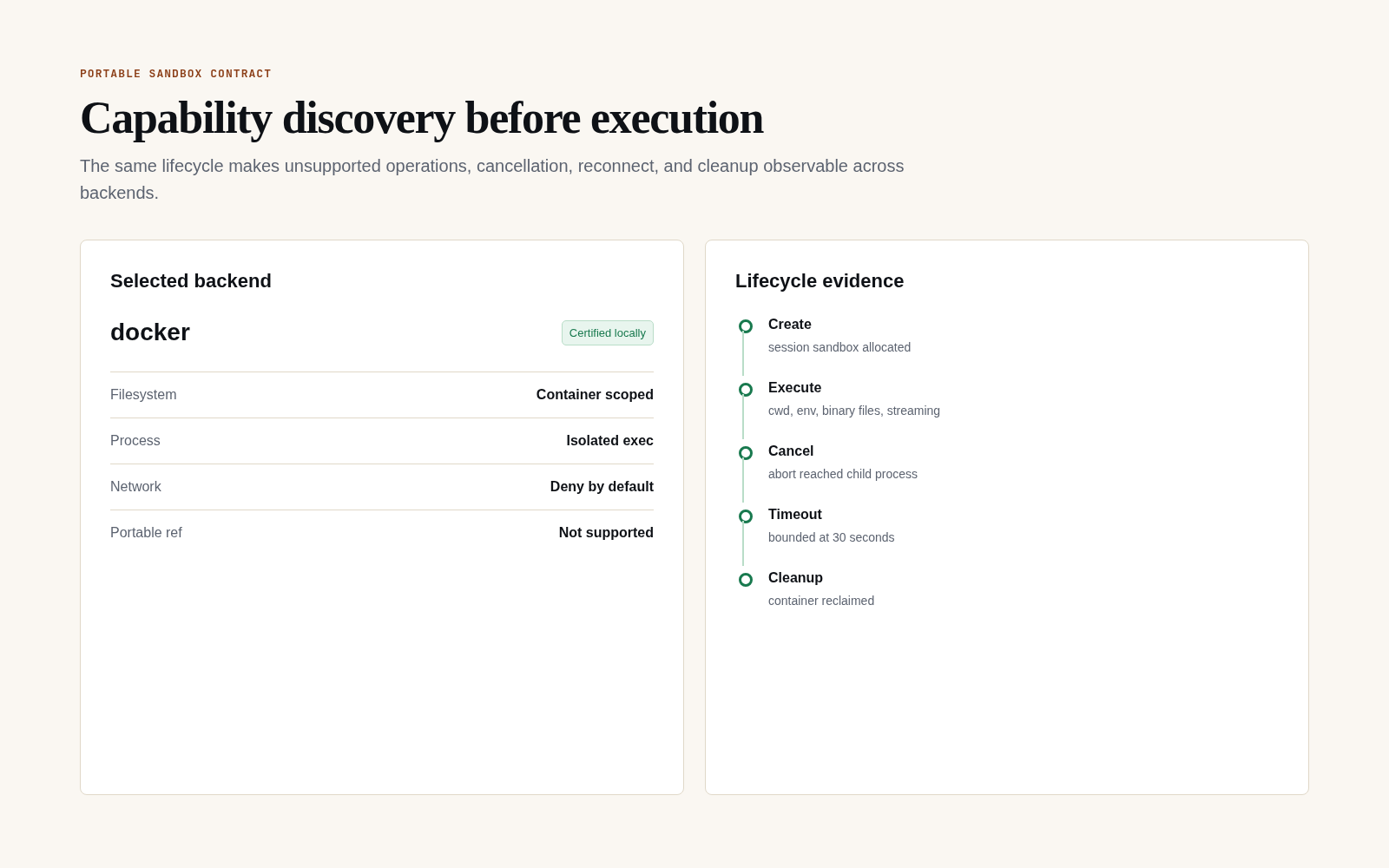
A successful command is only one part of sandbox evidence. Inspect declared capabilities first, then prove binary files, working directory and environment, streaming, timeout, abort, portable references where supported, reconnect, and cleanup.
Selecting a sandbox
The default import injects sandbox: 'virtual' automatically. Pick another by passing a value:
import { defineAgent } from '@fabric-harness/sdk';
import { getSandbox } from '@cloudflare/sandbox';
import { createCloudflareSandboxEnv } from '@fabric-harness/cloudflare';

export default defineAgent({
  run: async ({ init, env }) => {
    const sandbox = createCloudflareSandboxEnv(getSandbox(env.Sandbox, 'session-1'));
    const session = await (await init({ sandbox })).session();
    return await session.prompt('hello edge');
  },
});
Example: examples/with-cloudflare-sandbox/. Edge-deployed via fabric-harness build --target cloudflare.
import { defineAgent, schema } from '@fabric-harness/sdk/strict';

export default defineAgent({
  name: 'long-running',
  input: schema.object({ jobId: schema.string() }),
  run: async ({ init, input }) => {
    const fabric = await init({
      runtime: 'temporal',
      sandbox: 'local',
      compaction: { enabled: false },
    });
    return await (await fabric.session()).prompt(`Process job ${input.jobId}`);
  },
});
Example: examples/with-temporal/. Uses /strict because auto-compaction is non-deterministic across replays.
import { defineAgent } from '@fabric-harness/sdk';
import { AzureOpenAIModelProvider, createAzureKeyVaultSecretResolver } from '@fabric-harness/azure';

const provider = new AzureOpenAIModelProvider({
  endpoint: process.env.AZURE_OPENAI_ENDPOINT!,
  apiKey: process.env.AZURE_OPENAI_API_KEY!,
  deployment: 'gpt-5.5',
});

export default defineAgent({
  run: async ({ init, input }) => {
    const fabric = await init({ modelProvider: provider });
    return await (await fabric.session()).prompt(input.prompt);
  },
});
Example: examples/with-azure/, built with fabric-harness build --target foundry-hosted-agent.
import { defineAgent } from '@fabric-harness/sdk';
import { daytonaSandbox } from '@fabric-harness/connectors';
import { Daytona } from '@daytona/sdk';

const client = new Daytona({ apiKey: process.env.DAYTONA_API_KEY });

export default defineAgent({
  run: async ({ init, input }) => {
    const remote = await client.create({ image: 'node:22' });
    const fabric = await init({ sandbox: daytonaSandbox(remote, { cleanup: true }) });
    return await (await fabric.session()).prompt(input.prompt);
  },
});
Example: examples/with-daytona/. Daytona credentials stay in the Daytona client.
import { defineAgent } from '@fabric-harness/sdk';
import { ModalClient } from 'modal';
import { modalSdkSandbox } from '@fabric-harness/connectors/modal';

export default defineAgent({
  run: async ({ init, input }) => {
    const client = new ModalClient();
    const app = await client.apps.fromName('fabric-harness', { createIfMissing: true });
    const remote = await client.sandboxes.create(app, client.images.fromRegistry('node:22-alpine'));
    const sandbox = modalSdkSandbox(remote, { cleanup: true });
    try {
      const fabric = await init({ sandbox });
      return await (await fabric.session()).prompt(input.prompt);
    } finally {
      await sandbox.cleanup();
      client.close();
    }
  },
});
Example: examples/with-modal/, with the Modal credentials staying in ModalClient.
import { defineAgent } from '@fabric-harness/sdk';

export default defineAgent({
  run: async ({ init, input }) => {
    const fabric = await init({
      sandbox: { backend: 'docker', image: 'node:22', cleanup: true },
    });
    return await (await fabric.session()).prompt(input.prompt);
  },
});
Example: examples/with-docker/. Per-session container isolation; good fit for coding agents.
Sandbox vs runtime vs target
These are three orthogonal axes:
| Axis | Controls | Where it's set |
|---|---|---|
| Sandbox | Where shell commands and tool calls run. | init({ sandbox }). |
| Runtime | How sessions persist. stateless / inline / temporal. | init({ runtime }). |
| Target | The build artifact: Node process, Cloudflare Worker, Temporal worker, Foundry hosted agent. | fabric-harness build --target <name>. |
A Cloudflare Worker target most naturally pairs with the Cloudflare sandbox. A Temporal target most naturally pairs with runtime: 'temporal' and the /strict import. But the axes don't lock. You can deploy a Node target with a Daytona sandbox if you want.
Remote and platform sandboxes
RemoteSandboxApi keeps provider SDK types out of @fabric-harness/sdk, so application code can select a backend without changing the agent/session contract.
| Integration path | Use it for |
|---|---|
@fabric-harness/connectors | Daytona, E2B, Modal, and provider-owned remote sandbox objects. |
@fabric-harness/azure/aks-sandbox | Pod-backed execution on AKS. |
| Databricks SQL sandbox | Governed SQL Warehouse execution; session.shell() executes SQL rather than bash. |
remoteSandboxEnv() | Kubernetes, microVM, or proprietary execution services that implement the common remote contract. |
Use fh add when a provider needs project-specific lifecycle or SDK mapping. The sandbox capability matrix shows how to inspect capabilities at runtime.